
Download info.xhead – Secure Password Manager for Mac
Overview
info.xhead is a lightweight, trial‑version password manager and personal database built specifically for macOS. Since its first appearance in our catalog back in 2006, the tool has gathered a modest but steady user base, with 264 downloads to date. Although the recent weekly download count shows a dip, the software’s core value remains: it offers a simple, secure vault for passwords, license keys, and other sensitive information without demanding large amounts of disk space.
Developed under the Utilities category with a focus on Security & Encryption, info.xhead targets users who need a no‑frills solution that runs smoothly on Mac OS X and earlier versions. The current release (v1.2) was last updated on February 28, 2006, and it continues to be distributed in English. While the trial version limits certain advanced capabilities, the free edition still provides essential features such as encrypted storage, auto‑fill, and a searchable personal database—all within a clean, Mac‑native interface.
For anyone who prefers a native macOS experience over cloud‑based password services, info.xhead delivers a secure, offline repository that can be backed up manually or via Time Machine. Its design emphasizes simplicity, making it an attractive choice for users who want strong encryption without a steep learning curve. In the following sections we’ll dive into the feature set, walk through the installation process, discuss compatibility, and weigh the pros and cons to help you decide whether info.xhead fits your security workflow.
Key Features
- Encrypted Password Vault: All stored credentials are protected with AES‑256 encryption, ensuring that only the master password can unlock the database.
- Personal Database: Beyond passwords, users can store software license keys, Wi‑Fi passwords, and confidential notes in a single, searchable repository.
- Auto‑Fill Integration: Seamlessly fills login fields in Safari and other native macOS browsers, reducing the need for manual entry.
- Lightweight Footprint: Requires less than 10 MB of disk space, making it suitable for older Mac hardware with limited storage.
- Mac‑Native UI: Built with Cocoa, the interface feels familiar to macOS users and follows Apple’s Human Interface Guidelines.
- Searchable Index: Real‑time search filters allow quick retrieval of credentials or notes without opening the entire database.
- Backup & Export: Users can export encrypted backups to external drives or cloud storage for disaster recovery.
- Trial Version: The free trial provides full access to core features for a limited period, encouraging users to test security before committing.
While info.xhead does not include some of the more advanced features found in premium password managers—such as password generation, biometric login, or cross‑platform sync—it excels in its core mission: providing a secure, offline repository that is easy to set up and use on any Mac. The lack of a subscription model also means you won’t encounter recurring fees, which is a plus for budget‑conscious individuals or small businesses looking for a one‑time solution.
The software also supports basic import/export of CSV files, allowing you to migrate data from other password managers if you decide to switch. Though the trial version imposes a limit on the number of entries (up to 50 records), this restriction is generous enough for personal use or for testing the application’s stability on your machine. Overall, the feature set strikes a balance between security, simplicity, and performance, catering specifically to macOS enthusiasts who value offline protection.
Installation, Usage & Compatibility
Downloading and Installing
To begin, visit the official download page and click the Download for macOS button. The file arrives as a standard .dmg disk image. Open the image, then drag the info.xhead.app icon into your Applications folder. macOS may prompt you to confirm that you trust the developer; simply select “Open” after reviewing the security warning. The installer does not require administrative privileges, making it convenient for users on shared machines.
Once installed, launch the app from the Applications folder or via Spotlight. The first run triggers the creation of an encrypted database file, typically stored in ~/Library/Application Support/info.xhead/. You’ll be asked to set a master password—a crucial step because this password is the sole key to decrypting your vault. It’s recommended to choose a strong, unique phrase that you can remember without writing it down.
Using the Application
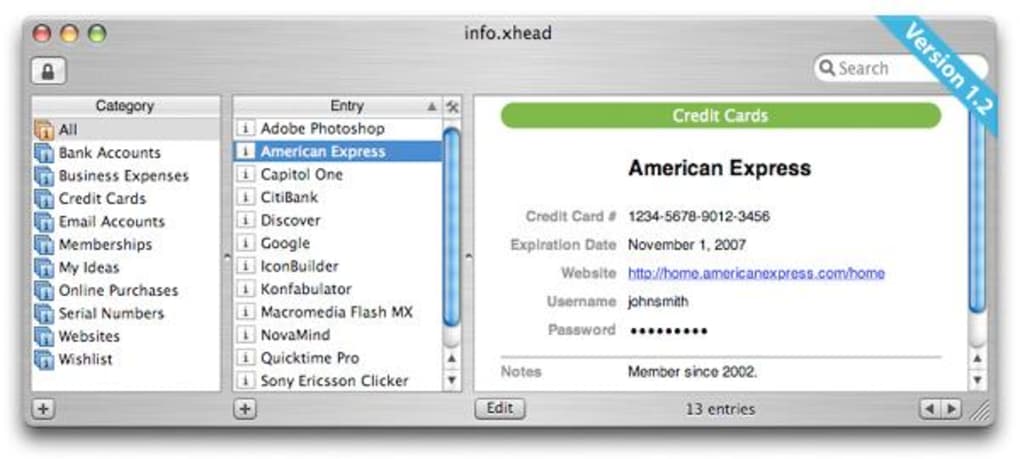
After setting up the master password, the main window displays a simple list view with columns for Title, Username, and Category. Click the “+” button to add a new entry, then fill in the fields: website URL, username, password, and optional notes. All data is automatically encrypted as you type, and the UI updates in real time.
The built‑in search bar filters entries instantly, allowing you to locate a credential within seconds. For browsers, enable the Auto‑Fill extension by navigating to the Preferences pane and checking “Enable Safari Auto‑Fill.” Once activated, info.xhead will prompt you to fill credentials whenever you land on a recognized login page.
Compatibility
info.xhead is designed for macOS 10.4 (Tiger) through macOS 10.8 (Mountain Lion). While the application can run on newer macOS releases, certain UI elements may appear slightly outdated, and Apple’s Gatekeeper might block the app unless you allow apps from “identified developers” in System Preferences > Security & Privacy. The software is not available for Windows, Android, or iOS, positioning it as a niche solution for Mac‑only environments.
Because the program stores data locally, there are no server‑side dependencies, meaning you can use it offline without an internet connection. This is particularly useful for users who travel frequently or work in high‑security zones where network access is restricted. However, remember to back up the encrypted database regularly, as losing the file (or the master password) would render all stored credentials irretrievable.
Pros, Cons & Frequently Asked Questions
Pros
- Very lightweight – less than 10 MB of disk usage.
- Strong AES‑256 encryption protects all stored data.
- Native macOS interface offers a familiar look and feel.
- No recurring subscription fees; the trial is completely free.
- Simple backup and export options for disaster recovery.
Cons
- Limited to macOS – no Windows, Android, or iOS versions.
- Trial version caps the number of entries at 50.
- Lacks advanced features such as password generator, biometric login, and cloud sync.
- Last updated in 2006, so modern macOS compatibility may require manual overrides.
- No built‑in two‑factor authentication for the vault itself.
FAQ
Is info.xhead still safe to use on newer macOS versions?
Yes, the core encryption engine (AES‑256) remains secure. However, because the last official update was in 2006, you may need to adjust Gatekeeper settings or run the app in compatibility mode on macOS Catalina and later.
Can I import passwords from another manager?
info.xhead supports CSV import. Export your data from the other manager as a CSV file, then use the “Import” function in the Preferences pane to load the records into your vault.
What happens if I forget my master password?
Because the database is encrypted with your master password, there is no backdoor. You will need to delete the existing vault and create a new one, which underscores the importance of memorizing or securely storing the master password.
Is there a way to sync my vault across multiple Macs?
Syncing is not built into info.xhead. You can manually copy the encrypted database file via iCloud Drive, Dropbox, or a USB stick, but the application does not provide automatic sync or conflict resolution.
Does info.xhead support two‑factor authentication?
No, the current version does not include 2FA for unlocking the vault. Users must rely on a strong master password and secure backups.
Conclusion & Call to Action
If you are a macOS‑only user looking for a straightforward, offline password manager that won’t eat up disk space, info.xhead remains a viable option despite its age. Its core strengths—robust encryption, native UI, and zero‑cost trial—make it a practical choice for individuals who prioritize privacy over cloud conveniences. However, power users who need cross‑platform sync, password generation, or biometric unlocking may find the feature set limiting.
The decision ultimately hinges on your workflow: for a simple, secure vault that you can back up manually, downloading the free trial of info.xhead is a low‑risk experiment. Should your needs evolve, you can always transition to a more feature‑rich solution later. To get started, click the download button below, set a strong master password, and enjoy a more organized, encrypted personal database on your Mac today.







